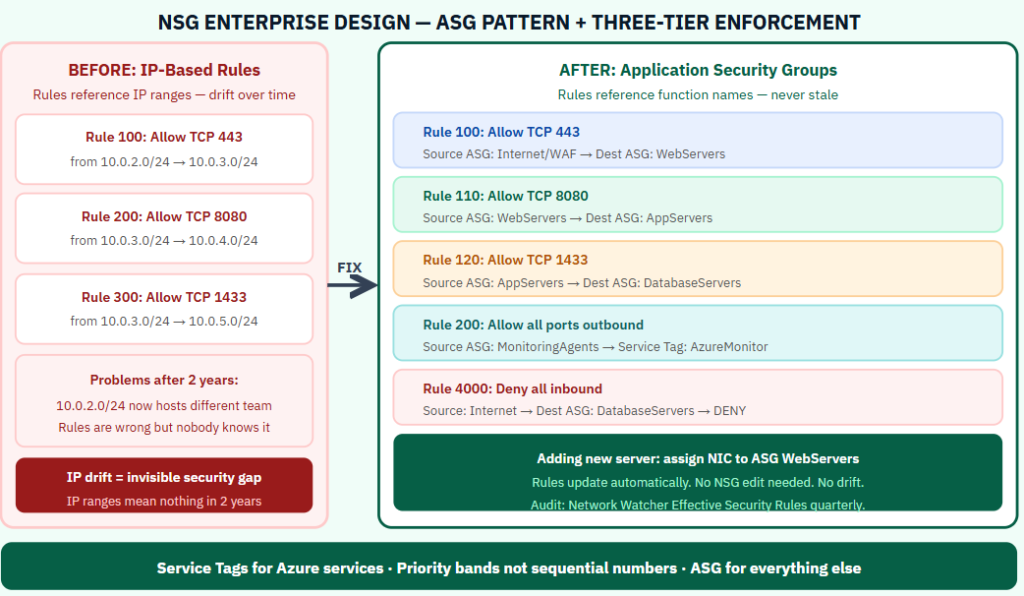
NSG rules written in 2021 for one migration task are still running in 2025. Nobody knows what they do. Nobody wants to delete them.This is NSG drift. It is the most common network security problem in enterprise Azure environments, and it compounds every year. Rules accumulate. IP ranges that were accurate get replaced by infrastructure changes. A rule that said “Allow 443 from 10.0.2.0/24” was written for a specific server farm. That farm was decommissioned. The VNET was reused. Now 10.0.2.0/24 means something completely different. The NSG design pattern that prevents drift while remaining readable at scale uses three elements that most teams treat as optional:
Why IP-Based NSG Rules Break at Scale
NSG rules that reference IP address ranges create a hidden dependency between the rule and the infrastructure topology. When VNETs are reorganized, subnets are moved, or compute is migrated to new address spaces, the rules become inaccurate without any warning. The rule still allows traffic. It just allows it to a different set of servers than it was intended to.
The solution is to decouple rules from IP addresses entirely using Application Security Groups.
Application Security Groups — The Core Pattern
An Application Security Group is a named group of network interfaces. You assign NICs to ASGs based on their role. NSG rules reference ASGs as source and destination rather than IP address ranges.
A rule that reads “Allow TCP 443 from WebServers to AppServers” remains accurate regardless of how many servers are in each group, what IP addresses they have, or how the VNET topology changes. Adding a new web server means assigning its NIC to the WebServers ASG. The rule updates automatically with no NSG modification required.
Design ASGs around function: WebServers, AppServers, DatabaseServers, MonitoringAgents, ManagementJumpboxes, CICDAgents. These names remain meaningful as the environment evolves.
The Priority Banding Model
Sequential rule priorities (100, 101, 102) force renumbering when rules are inserted. Priority bands solve this. Use ranges: 100–199 for explicitly allowed inbound, 200–299 for explicitly allowed outbound, 3000–3099 for explicit deny rules, 4094 for the catch-all inbound deny. Gaps within each band allow new rules to be added without renumbering existing ones.
Service Tags Over Hardcoded Ranges
For traffic destined to Azure platform services — Azure Monitor, Storage, Key Vault, Azure Active Directory — use service tags rather than IP address ranges. Service tags like AzureMonitor, Storage.WestEurope, and AzureActiveDirectory are maintained dynamically by Microsoft. Rules using service tags stay accurate without any maintenance. Rules using hardcoded IP ranges become stale every time Azure updates its service IP allocations.
The Three-Tier Enforcement Model
The web tier NSG allows inbound HTTPS from the internet (or WAF) to the WebServers ASG. It denies direct connections from WebServers to DatabaseServers. The application tier NSG allows inbound from WebServers to AppServers. It allows outbound from AppServers to DatabaseServers on the SQL port only. The database tier NSG allows inbound from AppServers only. It denies all inbound from the internet and all inbound from the web tier. Each tier has an explicit deny rule preventing the web tier from reaching the database tier directly, which would bypass the application logic that enforces business rules.
The Effective Security Rules Audit
Azure Network Watcher shows the effective security rules applied to a specific NIC — the combined result of all NSGs at the subnet and NIC level, evaluated in priority order. This is the authoritative answer to what traffic is actually permitted at a given resource. Run this audit quarterly on a sample of NICs from each tier. Compare the effective rules against the intended architecture. Discrepancies between what was intended and what is actually configured are NSG drift findings.
Use the Network Watcher IP flow verify tool to test specific traffic scenarios: does this source IP reach this destination port? The answer reflects the actual evaluated rule set, not the intended one.
For more information, check out the link below.
https://learn.microsoft.com/en-us/azure/virtual-network/network-security-groups-overview
Be the first to comment
Leave a Comment
💡 Comments are reviewed before publishing.