Most Conditional Access policies I review have the same flaw: a growing exclusions list that nobody revisits.
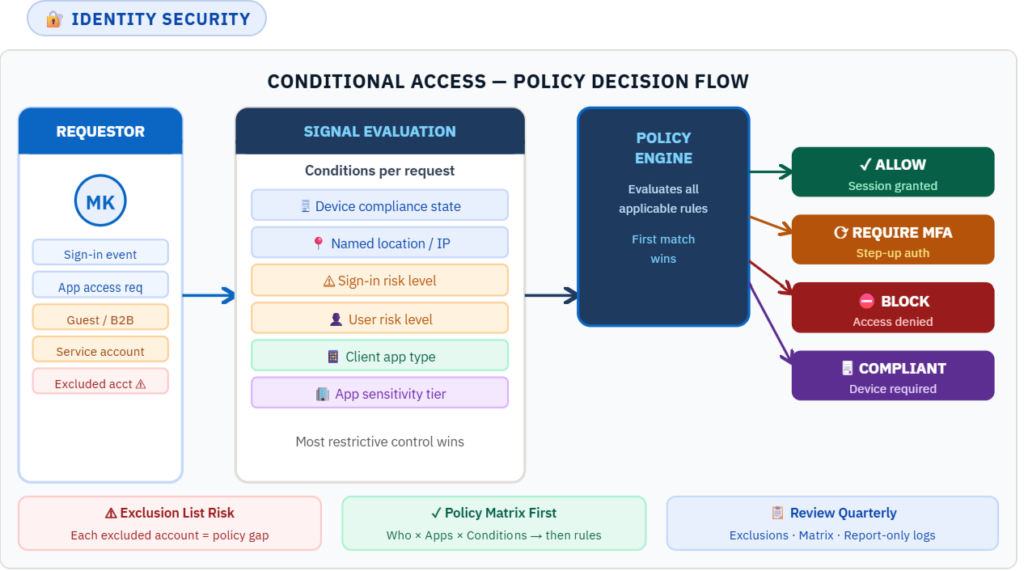
Start With a Policy Matrix, Not Rules
Before writing a single Conditional Access rule, build a policy matrix. Map every user population to the apps they access, the conditions that apply, and the controls required. A matrix forces clarity. It makes gaps visible before they become incidents.
A practical matrix has four columns: Who (user group or role), What (application or app sensitivity tier), When (conditions: risk level, device state, location), and Control (MFA, compliant device, block, session restriction).
The Exclusions List Is Your Attack Surface
Every excluded account is a policy gap. The first exclusion is usually a service account added because it broke a pipeline. Six months later there are twelve. A year later nobody can explain why half of them exist.
Treat the exclusions list like a security finding. Every entry needs a documented justification, an owner, and a review date. If it cannot be justified on those three points, it gets removed.
Use Risk Signals, Not Just Static Rules
Static rules — require MFA for all users on all apps — are a baseline. They do not adapt. Entra ID Protection generates sign-in risk and user risk signals based on behavioral analysis. Conditional Access can consume those signals and apply controls proportionate to the current risk level.
A high-risk sign-in from an unfamiliar location on a non-compliant device should not receive the same challenge as a normal sign-in from a known device. Risk-based policies make that distinction automatically.
Test in Report-Only Mode Before Enforcing
Report-only mode runs policy evaluation against real traffic and logs results without enforcing. It shows exactly how the policy behaves against your real user population before anyone gets blocked.
Never enforce a new CA policy without at least one week of report-only monitoring against production traffic. The false positives you find in that week cost far less than the support tickets you avoid.
The 5 Most Dangerous CA Misconfigurations
- Exclusion list with no review process. The most common finding. Each exclusion is a standing policy gap that accumulates silently.
- No device compliance requirement on high-sensitivity apps. MFA alone does not verify the device is uncompromised. Financial and HR applications should require a compliant device.
- Location policies using static IP allowlists. IP ranges rot. VPNs move. Cloud egress IPs change. Named locations need maintenance or they become inaccurate.
- Risk policies licensed but not configured. Many environments have Identity Protection licensed but never configure risk-based CA policies. The signals are generated; nobody acts on them.
- No session controls on unmanaged devices. A user on an unmanaged device accessing a sensitive app via browser should have session lifetime controls and download restrictions applied.
The Quarterly Review Process
Conditional Access requires ongoing governance. Each quarter: review the exclusions list and remove anything unjustified; update the policy matrix for new apps or user populations; review report-only logs for unexpected patterns. Assign a named owner for the CA policy set.