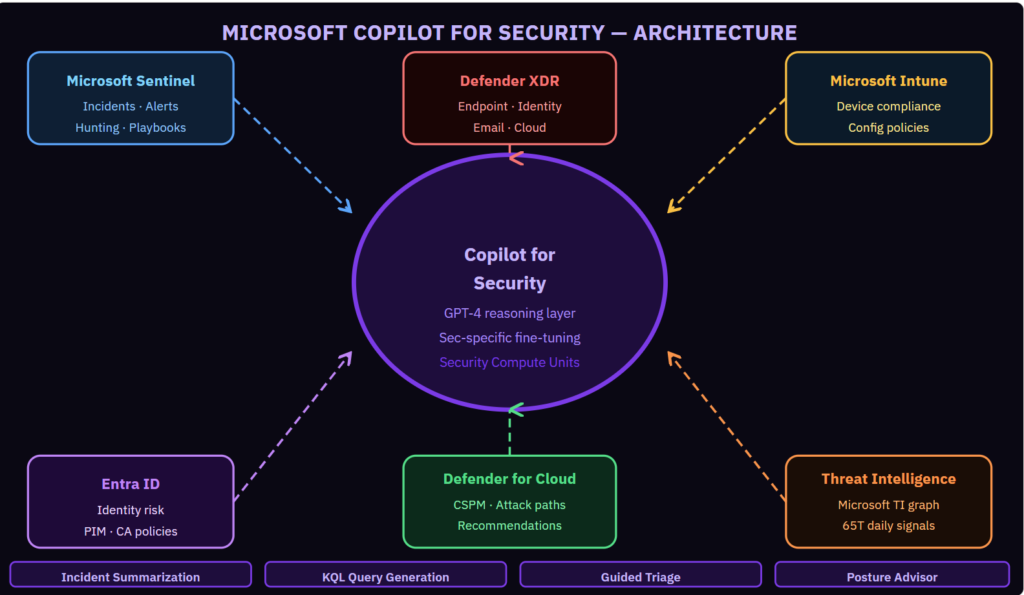
Copilot for Security is not a chatbot for security teams. It is a reasoning layer across every Microsoft security product you already run.The framing I see in most evaluations is wrong. Teams test it by asking generic questions and conclude it is a fancy search engine. That is not the use case. The value of Copilot for Security is in analyst augmentation during active investigations — when time matters, data is spread across five products, and a junior analyst needs to understand what a senior one would do next. Four specific workflows where it demonstrably reduces investigation time in financial services environments. Starting with the one that produces the most measurable impact:
Continue reading on mkoo-cloud.com ↓Full Copilot for Security architecture, the four high-value workflows with exact prompts, the promptbook library I built for financial services SOC teams, and the SCU sizing model for regulated environments.Show less
What Copilot for Security Actually Does
Copilot for Security is a reasoning layer that sits on top of Microsoft’s security data graph. It has access to the full context of your Sentinel incidents, Defender XDR alerts, Entra ID risk events, Defender for Cloud recommendations, and Microsoft’s global threat intelligence graph — 65 trillion security signals processed daily across Microsoft’s cloud infrastructure.
It can reason across all of that data in a natural language conversation. Ask it to summarize a Sentinel incident and it pulls the full alert context, the entity details, the MITRE technique mapping, and the related Microsoft threat intelligence and presents a coherent summary in 30 seconds. A skilled analyst doing the same manually takes 15 minutes.
Workflow 1: Incident Summarization (Highest Measurable Impact)
The scenario: a P1 incident fires at 2 AM. The on-call analyst opens Sentinel. There are 47 related alerts spanning five days, three entities, two products, and one MITRE technique chain that they need to understand immediately to decide whether to escalate.
With Copilot: “Summarize this incident, identify the most likely initial access vector, list all affected entities, and tell me what the attacker has accessed.” The response takes 40 seconds and is accurate to the data. The analyst spends their time making decisions rather than reading logs.
Workflow 2: KQL Query Generation
The scenario: during investigation, the analyst suspects lateral movement but does not know the KQL syntax for the specific query needed. “Write a KQL query that shows all authentication events for this user across all Azure resources in the 24 hours following the initial compromise alert.” Copilot generates syntactically correct, tested KQL that the analyst can run immediately and modify as needed.
This is particularly valuable for less experienced analysts who know what they need to find but need help with the query mechanics, and for novel hunting scenarios where no pre-built template exists.
Workflow 3: Guided Triage
The scenario: a medium-severity alert that looks benign but needs verification before closing. “Is this alert a true positive? What evidence supports or contradicts the hypothesis that this is malicious? What should I check next?” Copilot reasons through the available evidence, surfaces contextual information from threat intelligence, and provides a recommendation with its reasoning. The analyst validates the reasoning, not the data collection.
Workflow 4: Security Posture Advisor
Outside of active incidents: “What are the three most critical attack paths in my environment right now?” Copilot queries Defender for Cloud’s attack path analysis and the cloud security graph, and presents the highest-impact paths with the specific remediation steps that would eliminate each one. This surfaces insight that exists in the data but requires a skilled architect to extract manually.
Security Compute Units and Cost Model
Copilot for Security is billed by Security Compute Unit (SCU) hours. Each SCU handles a certain number of operations per hour. For a SOC team of 10 analysts with moderate investigation volume, 3–8 SCUs provisioned on-demand covers typical usage. The on-demand provisioning model means you do not pay for capacity when investigations are quiet.
For regulated environments with audit requirements: all Copilot for Security interactions are logged. Every prompt, every response, and every data source accessed is recorded in the audit log and exportable for compliance evidence.
Visit the link below:
#CopilotForSecurity #MicrosoftSecurity #SecurityCopilot #SOC #MVP
Be the first to comment
Leave a Comment
💡 Comments are reviewed before publishing.