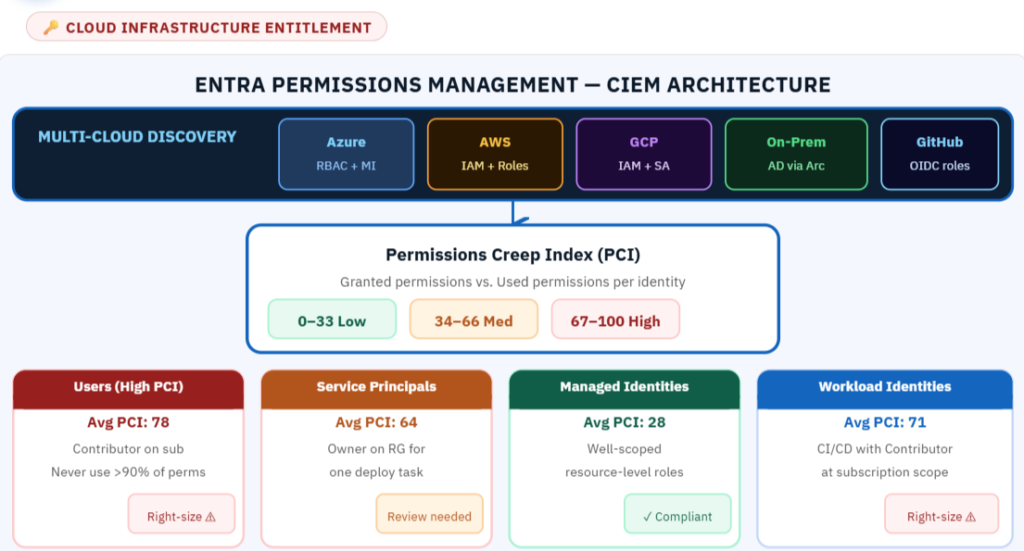
Access tends to grow as systems change. A deployment identity gets a broader role to fix a release, or a temporary assignment stays in place after a migration. Reviewing those permissions helps limit the damage if an identity is compromised.
Product update: Microsoft retired Entra Permissions Management on October 1, 2025. The review process below focuses on least privilege and does not recommend deploying that retired service.
Review effective access, not just assignments
Inventory users, groups, service principals, and managed identities. For each one, identify its owner, purpose, role assignments, inherited access, and relevant data-plane permissions. A narrow-looking assignment can still sit alongside much broader access through a group or parent scope.
Identity → effective permissions → observed activity → owner review → tested access change
Use activity as evidence, not an automatic deletion rule
Compare granted access with what the identity does, but account for gaps in logging and infrequent operations. Disaster recovery, certificate rotation, and quarterly jobs may not appear in a short observation window. No recent usage does not prove a permission is unnecessary.
Prioritize broad privileged roles, unknown owners, and access to critical assets. Keep the criteria explicit instead of applying an unexplained score or universal percentage threshold.
An example: a deployment identity
Suppose a pipeline deploys one application but has Contributor across a subscription. Confirm the resources and operations it actually needs, including shared dependencies. Test a narrower built-in role and scope first. Consider a custom role only when it solves a documented gap and someone will maintain it.
Run normal deployment, rollback, scaling, and recovery tests before removing the old assignment. Check that inherited or group-based assignments do not leave the original broad access in place.
Reduce standing privilege
For appropriate human administrative access, consider time-limited activation through Privileged Identity Management. Separate routine work from administration and review group membership. Workload identities need their own controls; human approval patterns do not automatically fit unattended jobs.
Measure progress honestly
Track the number of broad role assignments reviewed, changes completed, exceptions with expiry dates, and access-related failures after rollout. Explain the scope and denominator for any percentage you publish. Permission counts alone do not capture the impact of sensitive actions or escalation paths.
Review checklist
Name the identity owner. Record effective access and business purpose. Confirm logging coverage. Check rare but necessary operations. Test the proposed role and scope. Keep a rollback plan. Schedule a follow-up review and monitor new assignments.
Further reading
Azure RBAC best practices
Secure identity governance
Microsoft’s Permissions Management retirement announcement
Be the first to comment
Leave a Comment
Comments are reviewed before publishing.