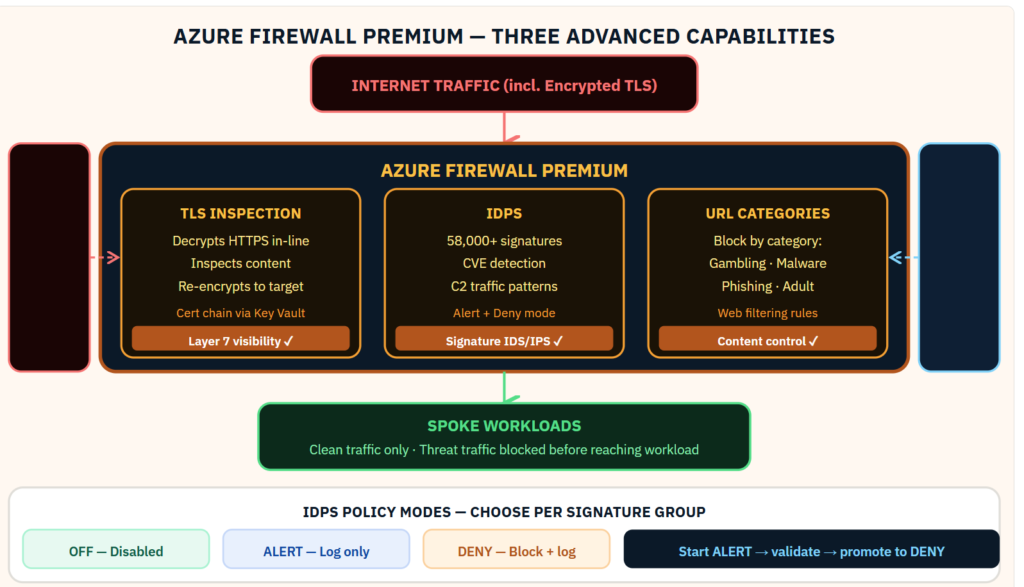
Most Azure Firewall deployments use 20% of what the Premium SKU can do. Here is what the other 80% looks like.Azure Firewall Standard enforces network rules and application FQDN rules. That is the foundation. Azure Firewall Premium adds three capabilities that change what the firewall can actually detect. TLS inspection. IDPS with 58,000+ signatures. URL categorization. Together they shift the firewall from a network-layer control to a Layer 7 security service that can identify threats in encrypted traffic — the traffic that most network security tools are blind to. In every hub-spoke environment I design for regulated financial services, these three Premium features are non-negotiable. Here is how they fit together:
Why Azure Firewall Premium Changes the Security Posture
Standard network security groups and Azure Firewall Standard operate at Layers 3 and 4: source IP, destination IP, port, and protocol. They cannot inspect the content of encrypted traffic. They cannot identify a CVE exploit embedded in a valid HTTPS session. They cannot distinguish a legitimate download from a malware payload delivered over port 443.
Azure Firewall Premium adds three capabilities that together address encrypted traffic, signature-based threats, and web content control. Combined with TLS inspection, the firewall gains visibility into the content of HTTPS sessions — the traffic that comprises the majority of enterprise internet egress.
TLS Inspection — The Certificate Chain Design
TLS inspection works by having the firewall terminate the TLS session from the workload, inspect the decrypted content, then re-establish a new TLS session to the destination. The workload trusts the firewall’s certificate because the intermediate CA certificate is distributed to all workloads through Group Policy, Intune MDM, or a configuration management tool.
The certificate chain: a root CA certificate is stored in Azure Key Vault. The firewall uses the Key Vault reference directly — the certificate never leaves Key Vault. The intermediate certificate issued from that root CA is distributed to workloads as a trusted root. Workloads see a valid certificate chain. The firewall sees the plaintext.
Critical: exclude certain certificate categories from TLS inspection to avoid breaking financial applications. Banking applications with certificate pinning, healthcare systems, and any application that performs its own certificate validation will break if their sessions are intercepted. Define bypass rules for these applications before enabling TLS inspection broadly.
IDPS — Signature Policy Tuning
The IDPS engine contains 58,000+ signatures organized by severity, attack category, and protocol. The default mode is Alert for all signatures — every match generates a log entry but traffic is not blocked. This is the correct starting mode. Running in Alert mode for 2–4 weeks against production traffic reveals how many of those signatures match legitimate traffic in your environment before any blocking is applied.
After the baseline period, promote high-confidence signatures to Deny mode: signatures for known malware C2 infrastructure, exploit kit traffic, and known CVE exploits in services you do not run. Leave signatures for services you do run in Alert mode until you have confirmed the false positive rate is acceptable.
Custom signature support allows you to add organization-specific indicators — threat intel shared by your ISAC, indicators from a Sentinel hunting query, or custom patterns for your proprietary application protocols.
URL Categorization
URL categorization allows application rules to reference Microsoft’s continuously updated URL category database rather than manually maintained FQDN lists. Block “Malware” and “Phishing” categories as a baseline. Block categories that violate your acceptable use policy. Allow “Banking and Finance” and “Business” categories for all users. The database updates automatically — your policy stays current without maintenance.
Sentinel Integration
Azure Firewall diagnostic settings send all network, application, NAT, threat intelligence, and IDPS logs to Log Analytics. The Azure Firewall data connector in Sentinel makes these logs available for analytics rules and hunting. A Sentinel rule that correlates an IDPS alert with a subsequent DNS query to the same threat actor infrastructure, combined with an Entra ID authentication event for the same host, creates a high-confidence incident that a network-only alert would never surface.
Below you can find the full guidance of premium features:
Be the first to comment
Leave a Comment
💡 Comments are reviewed before publishing.