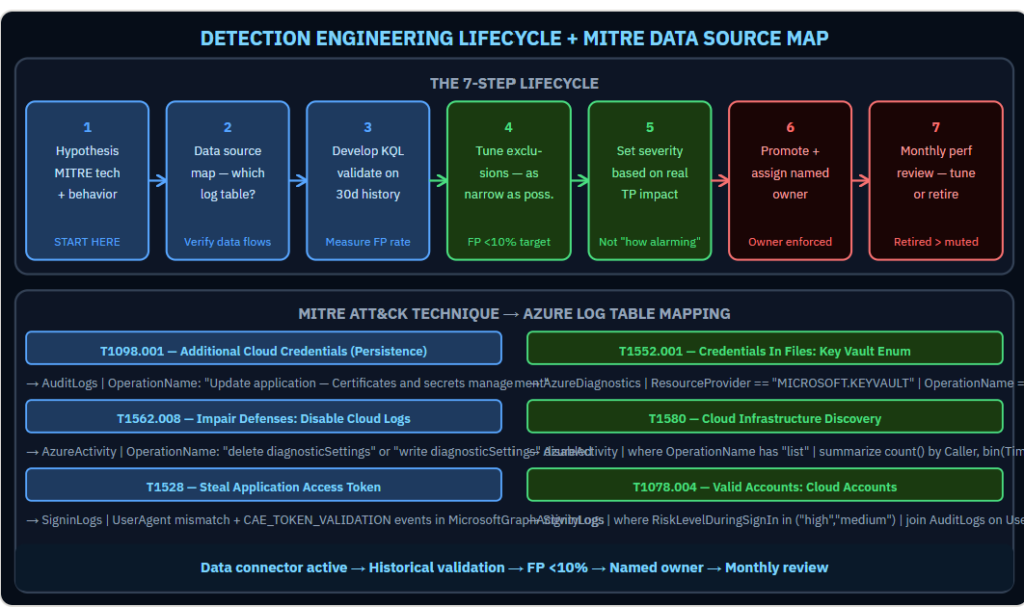
A detection rule that fires 800 times a day is not a security capability. It is noise. Noise gets muted. A muted rule is worse than no rule.Detection engineering is the discipline of building analytics rules that analysts actually act on. The difference between a good rule and a noise generator is not the KQL — it is understanding the adversary behavior deeply enough to isolate it from benign activity. The detection lifecycle that produces actionable rules has seven steps. Most teams do two of them: write the query, deploy to production. Here is what the other five do and why each one matters:
Why Most Detection Rules Underperform
A detection rule is a hypothesis that a specific pattern in log data indicates adversarial behavior. The hypothesis can be wrong in two directions: it can fire on benign activity (false positive) or fail to fire on actual attacks (false negative). Most production Sentinel deployments have too many false positives and unknown false negative rates. Both problems erode trust in the detection capability over time.
Step 1: Start With the Adversary Behavior, Not the Query
Every detection rule should begin with a MITRE ATT&CK technique ID and a specific statement of what evidence that technique leaves in your environment. T1078.004 (Valid Cloud Accounts) leaves evidence in SigninLogs. T1562.008 (Impair Defenses — Disable Cloud Logs) leaves evidence in AzureActivity. T1528 (Steal Application Access Token) leaves evidence in Entra ID audit logs and Microsoft Graph activity logs.
If you cannot state which log table contains the evidence, the rule cannot be written. Start with the technique, map it to the data source, then write the query.
Step 2: Map the Data Source Before Writing KQL
For each technique, verify the data connector is active and ingesting. A detection rule for Key Vault enumeration requires AzureDiagnostics with the Key Vault diagnostic category enabled. A detection rule for Kerberoasting requires Microsoft Defender for Identity sensor data. If the data source is not flowing, the rule cannot fire regardless of how accurate the query logic is.
Step 3: Develop and Validate Against Historical Data
Before deploying to production, run the query against 30 days of historical data. Count how many times it would have fired. Examine a sample of the results. Estimate the ratio of genuine suspicious activity to legitimate business patterns. A ratio worse than 1:10 (one true positive in ten alerts) means the rule needs more specificity before it is deployable.
Step 4: Tune Exclusions Precisely
Exclusions reduce false positives. They must be as narrow as possible. An exclusion that suppresses a rule for an entire user group removes detection coverage for that group. An exclusion that suppresses the rule only when a specific service account performs a specific action during a specific time window keeps the rule active for all other scenarios. The specificity of exclusions is the difference between a tuned rule and a broken rule.
Step 5: Set the Severity Accurately
Rule severity drives triage priority. A high-severity rule that fires on benign activity trains analysts to deprioritize high-severity alerts. Set severity based on the actual impact of a confirmed true positive, not on how alarming the technique sounds. A low-volume, high-confidence rule is more valuable at high severity than a high-volume, low-confidence rule.
Five Rules Every Financial Services Sentinel Needs
- Application credential added to existing registration (T1098.001): AuditLogs where OperationName contains “Update application — Certificates and secrets management.” High confidence. Sign of persistence after account compromise.
- Privileged PIM activation from new geographic location (T1078.004): AuditLogs where OperationName has “Activate” joined with IP geolocation lookup against 30-day baseline. Medium confidence.
- Diagnostic settings deleted within one hour of security alert (T1562.008): SecurityAlert joined with AzureActivity where OperationName contains “diagnosticSettings” and “delete” within one hour. High confidence of defense evasion.
- Key Vault bulk secret enumeration (T1552.001): AzureDiagnostics where OperationName is “SecretGet” and count exceeds threshold in 5-minute window. Tune threshold against legitimate application baseline.
- Subscription-level RBAC assignment after anomalous sign-in (T1098): SigninLogs with high risk level joined with AzureActivity roleAssignments write at subscription scope within 24 hours. High confidence privilege escalation indicator.
Step 6 and 7: Promote With an Owner, Review Monthly
Every rule in production has a named owner who reviews its performance monthly. The review checks: alert volume in the period, sample of true positives, sample of false positives, and whether the exclusion logic is still accurate. Rules that consistently underperform are either tuned further or retired. A retired rule is better than a muted one.
For more information, visit the Microsoft link below:
Custom analytics rules — Microsoft Learn
https://learn.microsoft.com/en-us/azure/sentinel/detect-threats-custom
1 Comment
Leave a Comment
💡 Comments are reviewed before publishing.